
Christmas QR code ideas

Make Christmas
scannable.

Nine real ways to use a QR code this Christmas, from a gift tag that opens a video message to an advent calendar that lives in one code. Each one says which plan it needs. Plenty of them work on the free plan.

Sample sheet of eight Christmas gift tags, each with a QR code labelled SAMPLE CODE

Our free sample gift-tag sheet

Christmas QR code ideas

Nine ways to put a code on Christmas.

Every idea below uses something CreateQRCodes does today. The phone previews are drawn by our page builder’s own preview, with Christmas text in place of the template’s.

01Works on Free

A gift tag that opens a video message

Record a short video, upload it where you keep videos (YouTube unlisted, Google Photos, iCloud), and put the link on a small Smart Page with a note. Print the code on the tag.

How it works: Smart Page (link + text blocks) · or a free static code straight to your video

Start from the link-in-bio page
02Needs Business

A QR code advent calendar: one code, a new door every day

Make one dynamic code. Add a Rotating URLs rule that starts on Dec 1 with 24 links in order, one per door. Add a Date range rule from Dec 25 at a higher priority so scans after the 24th land on a Merry Christmas page instead of starting over.

How it works: Smart Rules: Rotating URLs + Date range (Business plan)

See how Smart Rules work
03Needs Business

Holiday hours and a festive menu that switch by themselves

Keep your usual menu behind the table-tent code. Add a Date range rule for Dec 24 to Dec 26 that shows a holiday page with your special hours and menu. On the 27th the normal page comes back without you touching it.

How it works: Smart Rules: Date range + Smart Page Menu, Hours and Map blocks (Business)

Start from the café menu page
04Works on Free

A Secret Santa wish list behind one code

Put your size, your no-thanks list and a few links on a page. Drop the code in the Secret Santa hat. Cross things off by editing the page; the code stays the same.

How it works: Smart Page: link-in-bio template (link + text blocks)

Start from the link-in-bio page
05Needs Pro

Holiday party RSVPs on the invitation

Use the Event RSVP page: time, place and a form for names, guest counts and dietary notes. Print the code on the invite or the office poster. Replies collect in your Leads inbox.

How it works: Smart Page: Event RSVP + headcount template (form block)

Downloading the replies as a CSV is a Business feature.

Start from the Event RSVP page
06Works on Free

A Christmas lights tour map on a sign

List each stop as a link that opens directions in the phone’s maps app. Put the code on a yard sign or the community board. On Pro, a time-of-day rule can show a “lights are off, back tomorrow at 5” page after hours.

How it works: Smart Page link blocks · optional Smart Rule: time of day (Pro)

Start from the link-in-bio page
07Needs Business

A toy drive or food bank donation code

Put the code on drop-off boxes and posters. The page says what you need and where to drop it, has a Donate button that opens your own donation link, and a form for volunteers.

How it works: Smart Page: nonprofit donation template (Pay button + form blocks)

On Free or Pro, a plain link block to your existing donation page works too.

Start from the donation page
08Works on Free

Printable QR code gift tags and Christmas cards

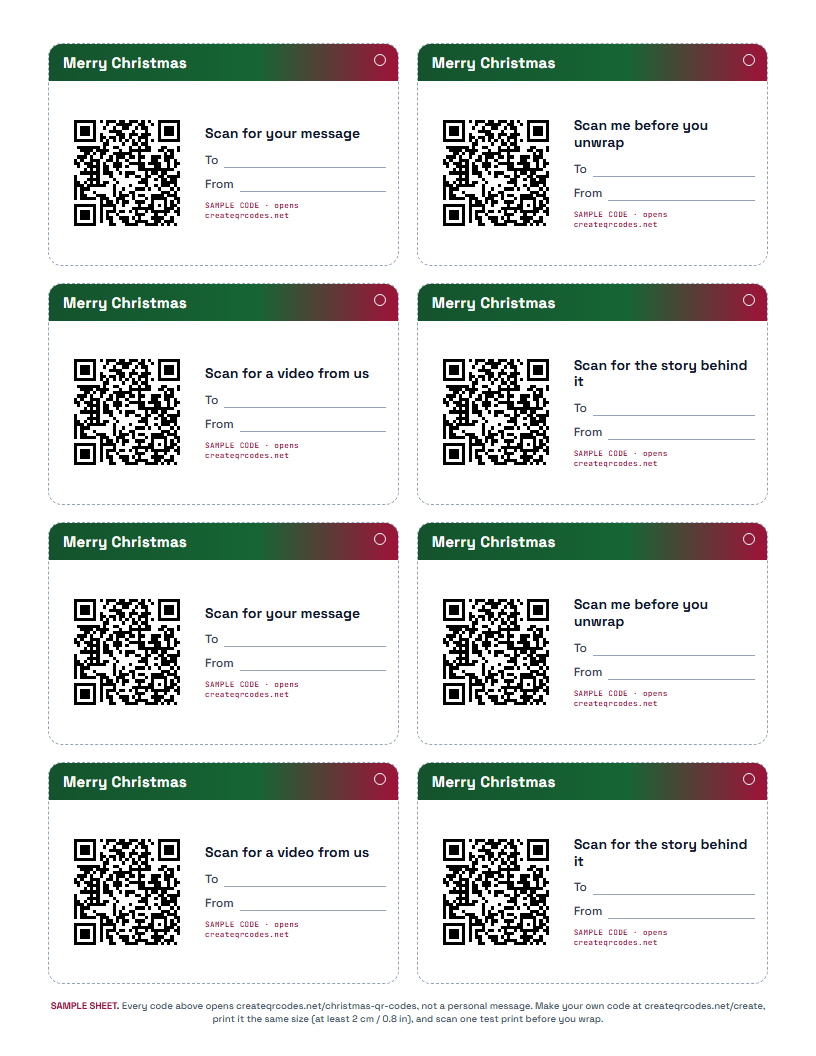
Download our sample tag sheet to see the size and layout, then make your own code at /create and print it the same size. Scan one test print before you wrap anything.

How it works: Free static code from /create + the sample sheet below

Free and Pro downloads carry a small “Made with createqrcodes.net” line under the code; Business removes it.

Make your code
Sample sheet of eight Christmas gift tags, each with a QR code labelled SAMPLE CODE
09Needs Pro

A crypto stocking stuffer on paper

Generate a paper wallet in the Holiday design, print it, and fold it so the key is hidden. The key is made in your browser and never saved to our servers.

How it works: Paper wallet templates: Holiday design (Pro)

Read about paper wallets
The part paper can’t do

Change it after it’s printed. See how many scan.

Cards get kept. Tags get found in February. With a dynamic code you can point the same printed code at something new in January, and see how many people scanned it, from which country and on which kind of phone.

  • Edit where a code goes after printing: 25 dynamic codes on Pro ($19.99/month), unlimited on Business ($59.99/month)
  • Total scans, an estimate of unique scanners, country and device for each dynamic code (Pro and up)
  • Printed codes keep working if you cancel; they go to the last place you set
How scan tracking counts
Free download

Printable QR code gift tags (sample sheet)

Eight tags on one US Letter page, with To and From lines. The codes on it are samples that open this page, and every tag says so. Use it to check size and layout, then print your own code in the same spot.

Which plan you need

Free gets you started. The clever bits are paid.

Free

Free

  • Static codes: free to make, never expire (one saved on a Free account)
  • One Smart Page with a small watermark
  • Gift tags, wish lists, lights tours, printable cards
Pro

$19.99/month

  • 25 dynamic codes you can change after printing
  • Scan tracking
  • RSVP and volunteer forms
  • Time-of-day and day-of-week rules
  • Holiday paper wallets
Business

$59.99/month

  • Unlimited dynamic codes
  • Date range and Rotating URLs rules (advent calendar, holiday hours)
  • Menu, hours, map and Pay blocks
  • Downloads without the “Made with” line
Questions

Christmas QR codes, straight answers.

Can I make a Christmas QR code for free?

Yes. The builder at createqrcodes.net/create makes a static QR code with no sign-up, and a static code never expires. A Free account keeps one saved code and one Smart Page (with a small watermark). Downloads on Free and Pro carry a small “Made with createqrcodes.net” line under the code. Changing a code after it is printed, scan tracking and forms need Pro.

Can a QR code on a gift tag play a video message?

A QR code holds a link, so it opens your video wherever it is hosted: an unlisted YouTube video, a Google Photos or iCloud shared link. Point a free static code straight at that link, or put the link on a Smart Page with a short note. A Smart Page can be edited after the tag is printed, so you can swap the video if you re-record it.

How do I make a QR code advent calendar?

Make one dynamic code and add a Rotating URLs rule that starts on December 1 with 24 links in order. Each day the same code opens the next link. Add a Date range rule from December 25 at a higher priority so scans after the 24th go to a Merry Christmas page. Rotating URLs and Date range rules are on the Business plan ($59.99/month).

Can I change a Christmas QR code after it is printed?

A static code cannot change. A dynamic code can: you edit where it goes and the printed code follows. Pro ($19.99/month) includes 25 dynamic codes and Business includes unlimited. The content of a Smart Page can be edited on every plan.

Can I see who scanned my Christmas cards?

Not who, but how many and roughly where. Pro and Business show total scans, an estimate of unique scanners, country and device for each dynamic code. Static codes are not tracked.

Do the codes stop working after Christmas or if I cancel?

No. A static code works for as long as the link it points to exists. A dynamic code keeps redirecting to the last destination you set, even if you cancel a paid plan. Point it at a thank-you page in January and the cards people keep will still open something.

Start with one tag.
It takes a minute.

Make a free code now. Add a page, a rule or tracking when you need them.